Here's a proof of concept showing that we don't need to use \includegrphics on the PDF generated by the previous compilation.
This method works by using \input{\jobname}, after having re-defined the frame environment to produce scaled minipages instead of actual frames.
Advantages
Although it's much more fragile than the \includegraphics version, it has the advantage that the thumbnail slide can contain a thumbnail of itself, to an arbitrary level of recursion, chosen by the user (where with the \includegraphics` version, this was just an accident, and you couldn't really choose the limit.
Limitations
In its current state, it probably won't work with beamer overlays (\only<1-3>{…}), frame options (including \begin{frame}{Frame title}…\end{frame} and \begin{frame}[allow frame breaks]…\end{frame}), will behave differently with \defs run between two frames, it will have issues with code that isn't designed to be run twice (frame numbers, footnote numbers, pgf's random…) , and has many issues with margins and alignment.
For example, here's the frame 10 of the code below:

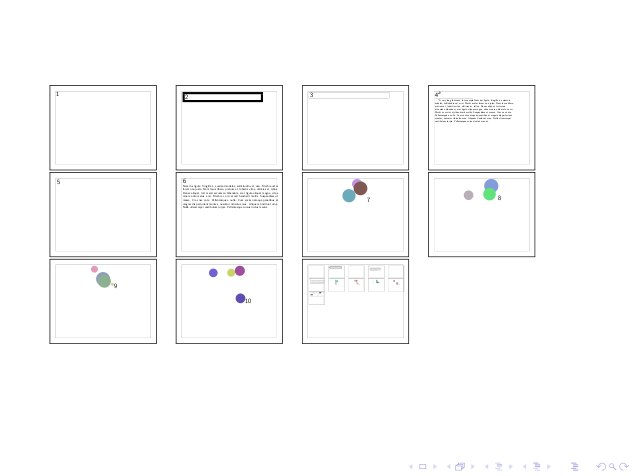
And here's the thumbnails frame, on frame 11, with, in the penultimate thumbnail, incorrect positionning of frame 10's figure, and different random circles:
Less talk, more code
Define a counter to remember the level of recursion when frames are drawn as thumbnails:
\ifx\recursivethumb\undefined\def\recursivethumb{}\newcounter{recursivethumb}\setcounter{recursivethumb}{0}\else\global\addtocounter{recursivethumb}{1}\fi\documentclass, \usepackages and \begin{document} are run only at the "top-level":
\ifnum\value{recursivethumb}=0\documentclass{beamer}\usepackage{boxedminipage}\usepackage{geometry}\usepackage{graphicx} % scalebox\usepackage{tikz}\usepackage{lipsum}\begin{document}\fiSome example frames:
\begin{frame} \Huge 1\end{frame}%\begin{frame} \multiply\fboxrule by 20% \begin{boxedminipage}{\linewidth} \Huge 2 \end{boxedminipage}\end{frame}%\begin{frame} \begin{boxedminipage}{\linewidth} \Huge 3 \end{boxedminipage}\end{frame}%\begin{frame} \Huge 4\footnote{A very long footnote, for example \lipsum[2]}\end{frame}%\begin{frame} \begin{tikzpicture} \node {\Huge 5}; \end{tikzpicture}\end{frame}%\begin{frame}{} {\Huge 6} \lipsum[2]\end{frame}%Some random frames:
\foreach \i in {7,...,10} {% \begin{frame}% \begin{center}% \begin{tikzpicture}% \foreach \c in {0,...,3} {% \pgfmathsetmacro\r{0.6*rnd+0.3}% \pgfmathsetmacro\g{0.6*rnd+0.3}% \pgfmathsetmacro\b{0.6*rnd+0.3}% \definecolor{CircleColor}{rgb}{\r,\g,\b}% \node[circle, fill=CircleColor, minimum size=rnd*2cm] at (rnd*5cm, rnd*4cm) {};% }% \end{tikzpicture}% \Huge \i% \end{center}% \end{frame}%}Create a savebox to save the frames when we'll re-\input the document:
\ifnum\value{recursivethumb}=0\newsavebox{\mybox}%\fiChoose the number of levels of recursion here:
\ifnum\value{recursivethumb}<3% Three levels of recursion, wheeeee !And create a frame containing the thumbnails:
\begin{frame}%Prevent linebreaks from creating new paragraphs:
\endlinechar-1%Backup the frame environment:
\let\oldframe=\frame% \let\oldendframe=\endframe%Replace the frame environment with an environment that saves the frame in \mybox and outputs a scaled and framed version of it (the minipage kinda destroys all margins and lengths, so those need to be reset to make it look like a real frame, not fully done here, footnotes won't be at the right position too). See this answer and this question, also to support overlays this should help :
\renewenvironment{frame}{% \xdef\oldhoffset{\the\hoffset}% \xdef\oldlinewidth{\the\linewidth}% \xdef\oldtextwidth{\the\textwidth} \xdef\oldcolumnwidth{\the\columnwidth} % TODO : save other dimensions that are modified by \boxedminipage. \endlinechar13% \begin{lrbox}{\mybox}% \boxedminipage{\paperwidth}% \minipage[t][\paperheight]{\paperwidth}% \linewidth=\oldlinewidth% \hoffset=\oldhoffset% \textwidth=\oldtextwidth% \columnwidth=\oldcolumnwidth% }{% \endminipage% \endboxedminipage% \end{lrbox}% \endlinechar-1% \fbox{\scalebox{0.15}{\usebox{\mybox}}} % }%Recursively \input the current document (note this is inside an \ifnum above, so it won't loop indefinitely):
\input{\jobname}%Restore the frame environment (if we were to lay out thumbnails on several physical frames, I think we'd have to cycle through "redefine frame/save, scale and show several frame/restore frame/new physical frame" several times):
\let\frame=\oldframe% \let\endframe=\oldendframe%Restore behaviour of linebreaks, terminate the physical frame onto which thumbnails are layed out, and terminate the \ifnum guarding against infinite recursion:
\endlinechar13%\end{frame}\fiInsert the \end{document} only if we're at the "top level":
\ifnum\value{recursivethumb}=0\def\maybeenddocument{\end{document}}\else\addtocounter{recursivethumb}{-1}\def\maybeenddocument{}\fi\maybeenddocumentReferences
(Non-exhaustive) list of stuff I used/didn't use while working on this:
- Here's where I learned about
\scalebox: How to scale Tikz drawings and text together? - My own question on how to make a
\scaleboxenvironment: Savebox with \bgroup/\egroup doesn't work in beamer (for environment) (I definitely need to dig into thelrboxenvironment's implementation) - Repeat scaled version of slide, \savebox and \usebox in multi-slide frame?
- A trick of mine to allow
\begin{document}…\end{document}to be nested (across several files usually, alastandalone).